
Order within the next
6 hours
30 minutes
and your product will ship today!
Contact
Visit Precision Roller on Facebook
Follow Precision Roller on Instagram Follow Precision Roller on X Watch Precision Roller on YouTube Follow Precision Roller on Pinterest
Save Today by Signing Up for Special Offers on Printer Ink, Toner, and Supplies

Lexmark E234 Drum Reset Procedure

Originally written for: Lexmark E234
  • Date:

    Sep 06, 2013

These instructions explain the procedure to reset the drum counter on a Lexmark E234 and similar models.

After replacing the imaging drum on this printer, it is recommended that the imaging

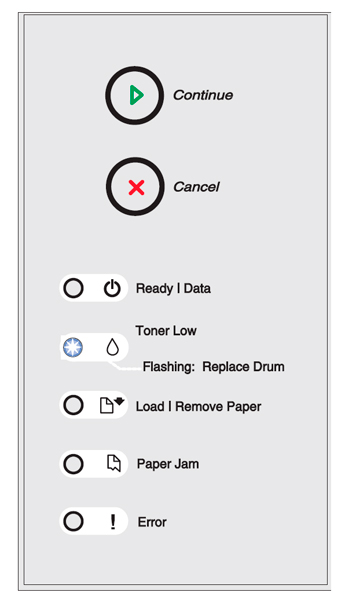
After replacing the imaging drum on this printer, it is recommended that the imaging drum’s counter be reset. To reset the counter, press and hold the "Cancel" button until all lights flash in sequence.

Step 1.
Open the front cover by pressing the button on the left side of the printer and lowering the cover.

Step 2.
Press and hold the "Cancel" button.

NOTICE:
Resetting the imaging drum's counter without replacing the imaging drum may damage your printer and void your warranty.

drum’s counter be reset. To reset the counter, press and hold the "Cancel" button until all lights flash in sequence.


Step 1.
Open the front cover by pressing the button on the left side of the printer and lowering the cover.

Step 2.
Press and hold the "Cancel" button.

NOTICE:
Resetting the imaging drum's counter without replacing the imaging drum may damage your printer and void your warranty.

  • Publisher: Precision Roller